2026-10-05 21:00
Reverse Shmaverse
Getting Low
Historically during CTFs the reverse engineering category receives little to no love from me, but you won’t read any coping today. We are now addressing the skill issue by taking on the daunting task of uncovering the secret pin code of this C program. In this writeup I will cover the GNU Debugger and the Assembly language to walk through this program step by step to retrieve the secret pin code the program expects from the end user.
File Info
Although I gave away the language the program is written in earlier, you won’t know the language or what operating system the program is written for. Our first command will be “file” where we are looking for which operating system the program is written for as well as which CPU architecture the assembly is written with.
file pincode2
The output reveals this is a program for Linux and uses Intel’s CPU architecture. Let's confirm that this program is written in the C programming language with the tool strings. Strings is a command-line tool that quickly grabs human-readable text from binaries, executables, and object files. Very,very useful. Check this out:
strings pincode2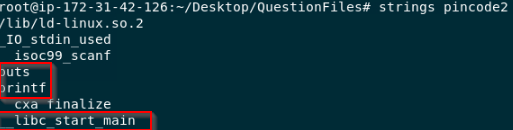
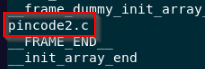
As you can see we have some common C functions from the standard I/O library as well as pincode2.c. The final good habit during information gathering for the reverse engineering process is using the program as intended. Nothing crazy here the program asks you for a pin code and prints text depending on if you get it correct or not. With reverse engineering or web app exploitation, using the things you’re trying to break is crucial to finding potential avenues for exploitation.
GNUuntite
So why debugging and why GNU Debugger? Very similar to malware analysis, debugging code can be accomplished with static techniques, dynamic techniques, or a mix of both. Software developers need tools to analyze their code and it can be helpful to walk through the instructions one at a time for troubleshooting, just like looking for the leak in a pipe, start from the beginning and follow. Debuggers allow developers to dynamically walk through their code. In our case we want to find the part of the instructions where it takes user input (our pin code we entered) and compares this to the correct pin code. Lets start GDB.
gdb -qThe -q is for quiet to not print the introductory and copyright messages. Select the file you wish to debug.
file pincode2List the functions of the program with:
info functions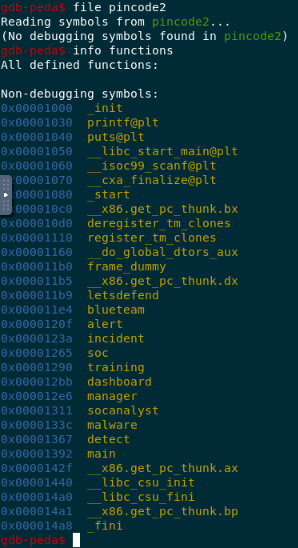
Due to this being written in C and having some background knowledge of writing C programs, set a breakpoint at main which is typically where the body of code is encapsulated in. Breakpoints are set at points in the code you want to begin stepping through it one instruction at a time.
main()
b mainThen run (FYI, this VM from Lets Defend is using the PEDA plugin as to why it looks this way. I've linked the documentation below).
runLet's pause at this next output of this first run.
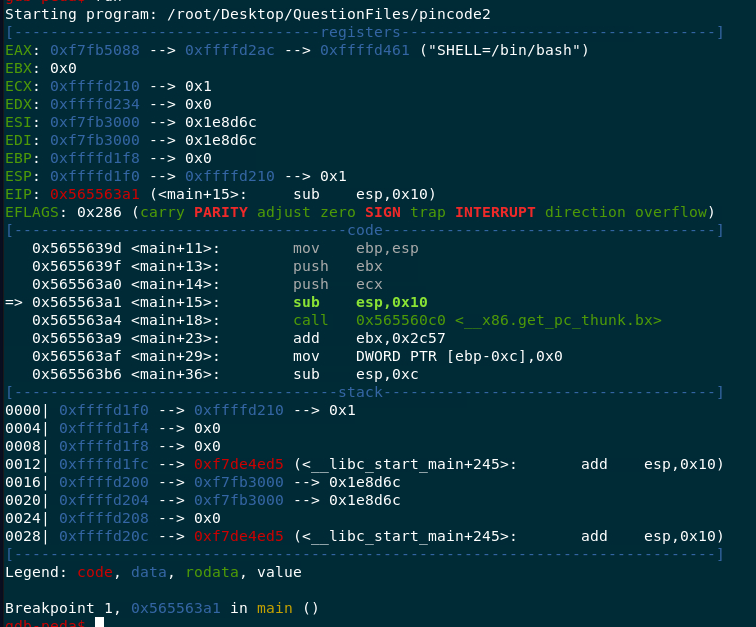
Understanding Assembly Instructions
Once you've ran the code you are presented with three sections: registers, code, and the stack. In the Assembly language registers are essentially compartments where certain data is held such as variables or memory addresses. The code section includes the point at which the code is run along with its instruction, such as where the arrow is at now, at the instruction of sub or subtraction. Let's fixate more on this for further understanding. The point at the code is at the memory address of 0x565563a1, main+15 just means we are 15 bytes from the first byte of the main function, and at this point the instruction to the CPU is to subtract 16 bytes (convert the 0x10 from hex to decimal) of an address the ESP register is holding; which is allocating space for something new to be stored there (the stack growing). The ESP register holds the most recent memory address of the stack. Which means it is a pointer to the most recent item on the stack. The stack is what the code uses as a scratch pad of the most recent function calls. The best way to think of it is if you are doing math with multiple functions where the previous function's answer will be used in the following function, you want some space in your notebook to remember what you already answered. That is what the stack is, memory address space allocated for local variables, function arguments, and the return address so the CPU knows where to go back to when a function finishes.
Look for What You Know
Continuing through the code we want to get to where the user input is received. Eventually we will pass call instructions to printf and scanf, both functions from the stdio library. Scanf looks for user input which is where we will trigger the user input again.
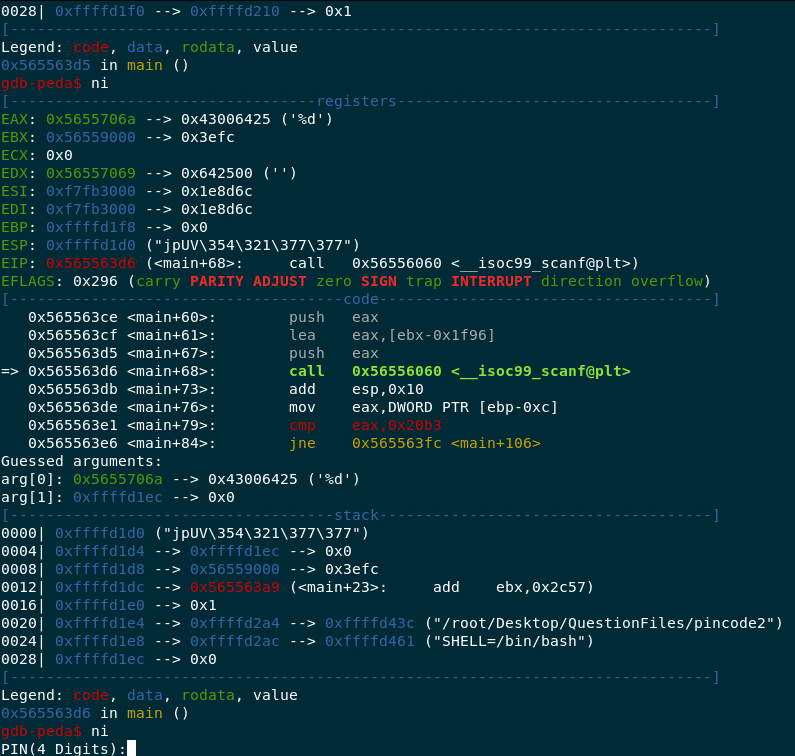
Now after moving down three instructions we can see, "cmp eax, 0x20b3", translates to whatever data is stored in the eax register, which is the register our input was just moved into with the previous instruction, is being compared to some hexadecimal. It is probably the actual pin code. Converting the hex of 0x20b3 to decimal gives us 8371. When we run the program in a terminal again and type in 8371, we are notified it is the correct pin.

Relevant Links
https://man7.org/linux/man-pages/man1/gdb.1.html
https://https://github.com/longld/peda